
Views: 0 Author: Site Editor Publish Time: 2026-11-15 Origin: Site


Industrial environments are notoriously hostile to standard computing hardware. Traditional desktop towers pack significant processing power, yet they routinely fail when exposed to factory dust, extreme temperatures, or relentless vibration. Their reliance on active cooling turns them into miniature vacuum cleaners that draw in the very debris capable of destroying their motherboards.
Enter the Fanless Mini PC, a highly compact computing device engineered to operate entirely without mechanical fans. Instead of using rotating blades to expel hot air, these advanced systems utilize passive cooling techniques. By leveraging physical thermodynamics and specialized heavy-duty chassis designs, they dissipate heat silently and effectively.
These robust machines directly address major operational pain points, including internal dust accumulation, catastrophic hardware failure, and constant ambient noise pollution. By stripping away the most vulnerable moving part of a computer, engineers have forged a highly stable platform that has quickly become the ultimate choice for professional applications. This comprehensive guide explores the core benefits of passive cooling, objectively compares fanless architecture to traditional setups, examines top industry use cases, and provides an evidence-based framework to help your organization make the right infrastructure investments.
Zero Noise and High Reliability: Utilizing passive cooling eliminates mechanical fan failures, ensuring completely silent operation in noise-sensitive environments.
Built for Harsh Environments: Devoid of ventilation holes, these systems are inherently resistant to airborne dust, metallic debris, and moisture ingress.
Cost-Effective Longevity: Ultra-low power consumption paired with significantly reduced maintenance requirements yields a drastically lower Total Cost of Ownership over the hardware lifecycle.
Versatile Professional Applications: From continuous digital signage and edge data gateways to sterile healthcare settings, passive computers seamlessly adapt to spaces where traditional hardware perishes.
Smart Buying Decisions: Selecting the optimal system requires evaluating specific technical factors, such as legacy interface availability, operating system flexibility, and specialized industrial mounting options.
Passive cooling relies entirely on the fundamental principles of thermodynamics to manage internal temperatures. In a standard consumer computer, a fan actively forces ambient air over a heat sink to chill the Central Processing Unit. Conversely, in a fanless system, the entire external metal chassis acts as a massive, unified heat sink.
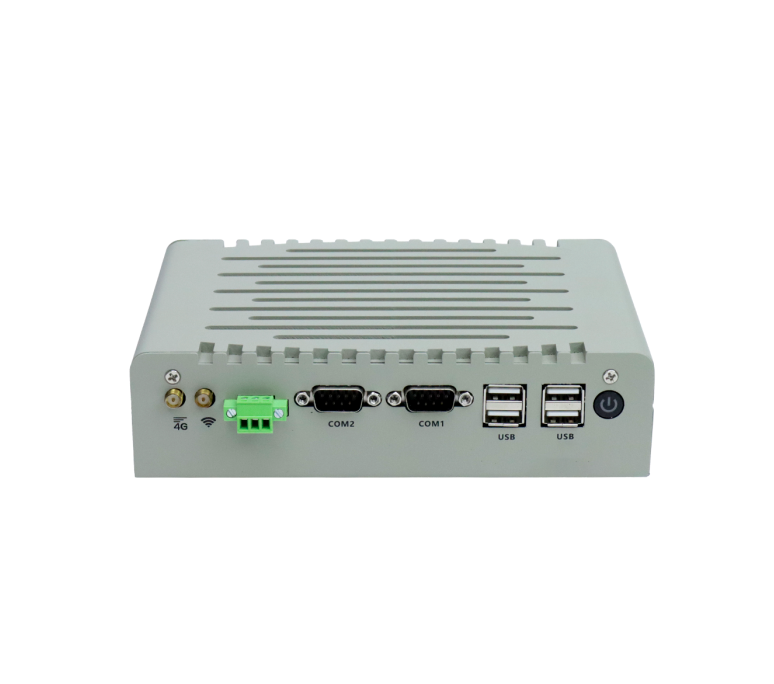
Manufacturers achieve this by integrating heavy-duty aluminum or copper blocks directly onto the processor and other heat-generating internal components. High-grade thermal paste and specialized thermal pads bridge the microscopic gaps, transferring thermal energy from the silicon die straight to the metal casing. To maximize efficiency, the exterior of the chassis is typically ribbed with deep extruded fins. This architectural choice dramatically increases the surface area exposed to the surrounding air, allowing heat to naturally radiate away from the device without any mechanical assistance.
Mechanical fans have historically been the weakest link in computing hardware. Moving parts inevitably succumb to wear and tear due to constant friction and bearing degradation. Worse still, active cooling systems pull in airborne dust, pet dander, chemical particulates, and ambient moisture. Over months of operation, this debris forms a thick, insulating blanket over the motherboard, leading to severe thermal throttling and ultimately hardware death.
By entirely removing the fan, designers are able to construct a sealed or semi-sealed enclosure. This physical barrier protects delicate internal circuitry from external contaminants, drastically extending the Mean Time Between Failures and ensuring consistent performance regardless of external air quality.
The paramount advantage of adopting a Fanless Mini PC is its unparalleled operational reliability. When paired with Solid State Drives, a passively cooled computer contains exactly zero moving parts. This pure solid-state architecture entirely eradicates mechanical wear and tear. Consequently, these machines exhibit remarkable resilience to physical vibrations and sudden shocks. Whether bolted to a vibrating forklift, installed inside a bustling CNC milling station, or mounted near heavy stamping machinery, they maintain uninterrupted uptime where spinning drives and fragile fan blades would instantly shatter.
Because these units do not require active airflow to chill their internals, they are purposefully designed without intake or exhaust vents. This sealed construction acts as an impenetrable shield. In notoriously messy environments like woodworking shops, commercial bakeries filled with flour, or factory floors laden with metallic dust, this resistance is critical. It actively prevents the electrical short circuits and catastrophic thermal failures that routinely plague standard ventilated desktop computers.
Acoustic management is a frequently overlooked metric in professional environments. The total absence of spinning fan blades means these devices operate at zero decibels. This absolute silence is invaluable for noise-sensitive locations such as hospital intensive care units, professional recording studios, public libraries, and luxury retail boutiques, where a sudden whirring fan would instantly break the desired atmosphere.
Under the hood, passive systems typically utilize mobile or embedded processors characterized by a low Thermal Design Power. These highly optimized chips consume merely a fraction of the electricity demanded by standard desktop processors. When scaling a deployment across dozens or hundreds of units, this sheer energy efficiency translates directly into massive utility savings. Coupled with the virtual elimination of routine physical maintenance and replacement hardware costs, organizations benefit from a dramatically lower Total Cost of Ownership.
Free from the spatial constraints of accommodating bulky cooling fans and internal air circulation channels, passive PCs are engineered to be astonishingly compact. Their diminutive physical footprint allows for incredibly versatile installation. IT teams can discreetly hide them behind monitors using standard VESA brackets, slide them seamlessly into interactive self-service kiosks, or pack them into crowded server cabinets to reclaim valuable floor space.
Active cooling systems remain a necessity for computing tasks that generate extreme thermal loads. Applications demanding high-wattage processors and dedicated graphics cards absolutely require active airflow. Without a fan to rapidly expel the massive heat generated by intensive 3D architectural rendering or complex video editing, internal components would quickly melt or severely throttle their performance to prevent self-destruction.
On the other hand, fanless systems reign supreme for continuous 24/7 operation, commercial deployments, and harsh industrial environments. If your primary organizational goals are absolute system stability, zero maintenance, and environmental resistance rather than raw graphical horsepower, passive cooling is the most logical and cost-effective architectural choice.
To simplify the infrastructure decision-making process, consider the objective operational differences outlined below:
Feature / Metric | Fan-Cooled Mini PCs | Fanless Mini PCs |
|---|---|---|
Cooling Method | Active Mechanical Fans | Passive Chassis Heat Sinks |
Noise Level | Audible to Loud under heavy load | Completely Silent at 0 dB |
Maintenance Needs | High routine dust cleaning | Extremely Low occasional exterior wipe |
Environmental Tolerance | Low vulnerability to dust and moisture | High sealed against airborne contaminants |
Power Consumption | Moderate to High | Very Low and highly energy-efficient |
Ideal Use Case | Heavy rendering, workstations, gaming | 24/7 commercial, industrial, signage |
Selecting the appropriate internal hardware hinges entirely on your specific workload. Simple digital signage loops or basic data collection tasks run flawlessly on low-power ARM-based processors. For instance, advanced industrial series often leverage high-performance Rockchip processors like the RK3288 or RK3568. These embedded chips deliver robust quad-core processing power while maintaining an ultra-low thermal footprint, making them perfect for continuous edge computing tasks without localized bottlenecks.
In industrial and commercial arenas, rich connectivity is non-negotiable. It is vital to seek out systems that offer comprehensive interfaces. A truly industrial-grade unit will feature dual Gigabit Ethernet ports for network redundancy, multiple USB 3.0 ports for peripheral expansion, and high-definition HDMI outputs supporting 4K displays. Furthermore, legacy interfaces like RS232 or RS485 COM ports are absolutely essential. These legacy ports remain the industry standard for interfacing with older manufacturing equipment, Programmable Logic Controllers, and specialized barcode scanners.
Professional environments demand operating systems tailored to their specific security protocols and software ecosystems. While traditional enterprise environments often default to standard desktop operating systems, Android is rapidly becoming the preferred platform for dedicated industrial applications. Its lightweight architecture, highly customizable interface, and absence of expensive enterprise licensing fees make it exceptionally efficient for dedicated terminal usage.
A commercial computer must integrate safely and securely into its physical environment. Before purchasing, verify that the device supports standard VESA mounting for discreet attachment to the rear of display monitors. For factory and automation settings, ensure the rugged aluminum alloy chassis features DIN-rail mounting capabilities for secure placement inside industrial control panels.
Deep within dusty factory floors, fanless industrial computers operate as the central nervous system for modern automation. They serve as highly reliable Human-Machine Interface controllers, enabling operators to monitor heavy machinery safely. Simultaneously, they function as secure edge gateways, continuously harvesting sensor data from the production line and transmitting it to central servers, completely unfazed by the airborne metallic dust that would suffocate a standard PC.
Silent, visually unobtrusive computing units are the driving force behind modern retail advertising. They are the hidden engines powering vibrant 4K digital signage in sprawling shopping malls, outdoor wayfinding kiosks, and fast-food drive-thru menu boards. Because these advertising mediums demand continuous video playback, the passive cooling design guarantees the system will not overheat and crash due to clogged air intakes.
Modern hospitals demand sterile, easily sanitizable environments. Passively cooled computers are frequently deployed in surgical operating rooms, patient recovery wards, and mobile medical carts simply because they do not circulate airborne pathogens or dust particles. Adding to their medical utility, their completely silent operation guarantees they will never disturb resting patients or interfere audibly with critical life-monitoring equipment.
Recent market analyses indicate a massive paradigm shift toward edge computing across global industries. As businesses strive to push processing power closer to the actual sources of data, rather than relying solely on distant centralized cloud servers, the demand for decentralized rugged hardware has skyrocketed. Industry experts note that modern network deployments specifically require terminal hardware capable of surviving unconditioned, harsh environments while maintaining absolute, uninterrupted uptime.
For organizations seeking to leverage this decentralized trend in demanding physical environments, an Fanless Mini PC running Android bridges the gap perfectly between software agility and hardware invulnerability. These specialized devices merge the intuitive, user-friendly nature of modern operating systems with ruggedized, sealed metal chassis designs, delivering a reliable foundation built explicitly to conquer modern industrial demands.
Proper physical installation is the ultimate key to maximizing the lifespan of passive cooling systems. Although they lack internal fans, these computers still fundamentally require ambient airflow around the exterior chassis. This allows the extruded heat sink fins to effectively bleed thermal energy into the room. A crucial rule of thumb is to mount the device in a location where air can naturally circulate. Never bury a passive PC under insulating materials, and avoid placing it inside a completely sealed, unventilated box. Doing so traps the radiating heat, creating an oven effect that will eventually trigger severe thermal throttling.
One of the most celebrated advantages of passive cooling is the near-total elimination of IT maintenance. Because there are no internal fans actively sucking in dirt, technicians never need to open the chassis for deep, intrusive cleaning. Routine maintenance is delightfully minimal. It is limited to occasionally wiping down the exterior heat fins with a dry microfiber cloth. Removing surface dust buildup ensures the bare metal retains its optimal thermal radiation properties year after year.
Transitioning to a fanless architecture is far more than a simple hardware swap. It is a strategic investment in operational reliability, acoustic silence, and long-term longevity. By eliminating the mechanical vulnerabilities of traditional fans, these robust devices easily outperform standard desktop towers across almost every demanding commercial and industrial metric.
For modern businesses looking to drastically reduce IT downtime, eliminate routine physical maintenance, and secure their localized data processing, upgrading to passive cooling is the clear choice. Taking the time to evaluate your specific environmental needs and software requirements will ensure seamless daily operations. We highly encourage IT professionals and facility managers to upgrade their infrastructure by exploring the high-quality Fanless Mini PC solutions from Vincanwo Group to guarantee maximum uptime for your next critical deployment project.
Under normal intended operating conditions, they will not overheat. They are meticulously engineered with heavy-duty exterior heat sinks designed to perfectly manage the specific thermal output of their internal components, backed by automatic thermal throttling safeguards. However, user error can cause overheating if the device is placed inside a completely enclosed, unventilated box or left exposed to direct, intense sunlight where ambient heat cannot naturally escape.
Yes, continuous 24/7 operation is exactly what they are designed for. The complete absence of mechanical moving parts makes their architecture incredibly stable. This unwavering reliability makes them the undisputed industry standard for demanding applications like continuous digital signage loops, network firewall servers, and critical industrial automation where operational downtime is simply unacceptable.
They are excellent machines for retro gaming emulation, cloud-based gaming services, and lightweight casual titles. However, for high-end, graphically intense gaming, they fall short. Modern gaming generates extreme amounts of heat that typically exceeds the physical dissipation capabilities of passive cooling designs, making active-cooled systems the necessary choice for hardcore gamers.
Because they completely lack moving parts prone to mechanical failure, passive computers routinely outlast traditional active-cooled towers. Depending on the harshness of the operating environment and the intensity of the daily computing workload, it is incredibly common for these rugged systems to run flawlessly for 5 to 10 years, or even longer, without requiring a single hardware replacement.
Due to their reliance on mobile and embedded processors, these devices are incredibly energy efficient. Most industrial passive computers operate comfortably within a 10 to 25-watt power draw under typical loads. This is a mere fraction of the 300 to 500 watts routinely consumed by standard desktop towers, making them highly economical for large-scale, continuous deployments.
Android offers an open-source, lightweight architecture that is free from expensive enterprise licensing fees. It excels in kiosk mode, allowing administrators to lock the device to a single dedicated application, preventing unauthorized user tampering. This makes it the ideal platform for interactive retail touchscreens, point-of-sale systems, and automated industrial control interfaces.


