
Views: 0 Author: Site Editor Publish Time: 2026-09-30 Origin: Site


Can standard computers survive your factory floor? The short answer is absolutely not. Airborne metallic dust, ambient heat from processing equipment, and the constant vibrations of heavy machinery destroy consumer-grade tech at an alarming rate. Why risk a massive production halt on fragile office equipment? This fragility causes costly downtime that cripples operational efficiency and eats directly into your profit margins.
In this comprehensive engineering guide, we will explore how robust Industrial PCs solve these persistent environmental issues. You will learn the critical differences between commercial and industrial hardware, understand the thermal mechanics behind fanless designs, and gain actionable insights on choosing the perfect system for your specific manufacturing needs.
Key Takeaways
Rugged Engineering: These computing systems are specifically ruggedized to withstand extreme temperature fluctuations, continuous mechanical vibrations, airborne dust, and moisture on the plant floor.
Lower Total Cost of Ownership: Unlike standard commercial computers that fail quickly under stress, plant-floor hardware offers extended lifecycles of 5 to 10 years. This reliability significantly reduces your long-term maintenance costs.
Seamless Integration: Fanless designs and a wealth of legacy input and output ports allow for flawless integration with existing factory machinery, Programmable Logic Controllers, and supervisory control networks.
Optimal Form Factors: Selecting the right physical design, such as an all-in-one panel running a highly stable operating system like Linux Ubuntu, is critical for modern Human-Machine Interface applications and automated workflows.
At its core, an industrial computing platform is a robust processing system designed specifically to operate reliably in the most unforgiving environments. While they share the exact same fundamental processing architecture as the standard desktop computer sitting in an office, their physical construction and thermal management systems are entirely re-engineered for heavy-duty, continuous workloads.
These specialized machines act as the central nervous system of the modern plant floor. They seamlessly handle mission-critical tasks ranging from high-speed machine vision and automated robotic control to complex data acquisition and Internet of Things connectivity.
Recent industry analyses reveal a massive acceleration in edge computing deployments across global manufacturing sectors. As facilities transition to smart manufacturing, relying solely on centralized cloud infrastructure is no longer viable. Cloud latency and bandwidth bottlenecks simply cannot support real-time robotic control or high-speed visual inspection. Instead, modern plants are pushing processing power directly to the edge. This localized data processing enables instant, AI-driven analytics right on the plant floor, forming the absolute foundation of modern Industry 4.0 architecture.
Understanding the stark distinction between commercial and industrial hardware is vital for smart procurement decisions. Implementing consumer-grade technology in a manufacturing setting almost always leads to premature hardware failure, thermal throttling, and operational headaches.
Feature | Commercial PCs | Industrial Hardware |
|---|---|---|
Build Quality | Plastic or thin metal chassis. Highly prone to physical damage and heat warping. | Extruded aluminum or stainless steel. Highly resistant to physical impact and chemical corrosion. |
Cooling Mechanism | Active cooling using spinning fans. Draws in dust, flour, and metallic particles that cause short circuits. | Passive cooling via fanless heat sinks. Completely sealed against airborne debris and moisture. |
Component Grade | Standard commercial motherboards. Limited temperature tolerance and easily shaken loose by vibration. | Industrial-grade components. Wide-temperature tolerance, soldered memory, and extreme vibration resistance. |
Lifecycle | 1 to 3 years before planned obsolescence or catastrophic hardware failure. | 5 to 10 years of guaranteed component support and operational stability. |
Consequently, the initial capital expenditure for industrial hardware is higher than that of commercial computers you might find at a retail store. However, this premium acts as a direct insurance policy against the devastating risk of operational downtime.
Plant-floor hardware must actively resist environmental contaminants. This resistance is standardized and measured by Ingress Protection ratings. For instance, an IP65 rating indicates that the enclosure is completely protected against dust ingress and can easily withstand low-pressure water jets from any direction. For environments requiring extreme sanitation, such as a meat processing facility that uses high-pressure washdowns, IP67 or IP69K ratings are absolutely mandatory to prevent internal water damage and bacterial growth.
Mechanical failures are a primary cause of computer downtime in environments dominated by heavy machinery. Standard computers rely on spinning fans for cooling and mechanical hard drives with delicate read and write heads for storage. In stark contrast, industrial computing solutions utilize a fanless design. They dissipate internal heat through heavy-duty aluminum enclosures that act as massive, passive heat sinks. By combining this passive cooling strategy with Solid-State Drives, the architecture completely eliminates moving parts. This engineering choice makes the system virtually immune to continuous vibrations and sudden mechanical shocks.
Manufacturing environments rarely maintain the comfortable, climate-controlled conditions of a corporate office. Therefore, industrial hardware is engineered with wide-temperature components that allow continuous operation in extreme conditions. They function flawlessly whether installed in a freezing cold storage warehouse or mounted directly next to a scorching industrial furnace. Beyond thermal endurance, they feature wide voltage inputs and built-in surge protection to easily absorb the erratic power fluctuations frequently caused by heavy machinery starting and stopping on the factory floor.
Specifically, selecting the correct form factor is a foundational step in your hardware procurement strategy. The physical space available, your specific mounting requirements, and the intended software application will ultimately dictate which type of system performs best in your facility.
This highly popular form factor integrates a high-resolution touchscreen monitor with a ruggedized computing unit into a single, seamless enclosure. They have become the definitive industry standard for Human-Machine Interface applications. This setup allows floor operators to intuitively control machinery, monitor production metrics, and input data directly at the source.
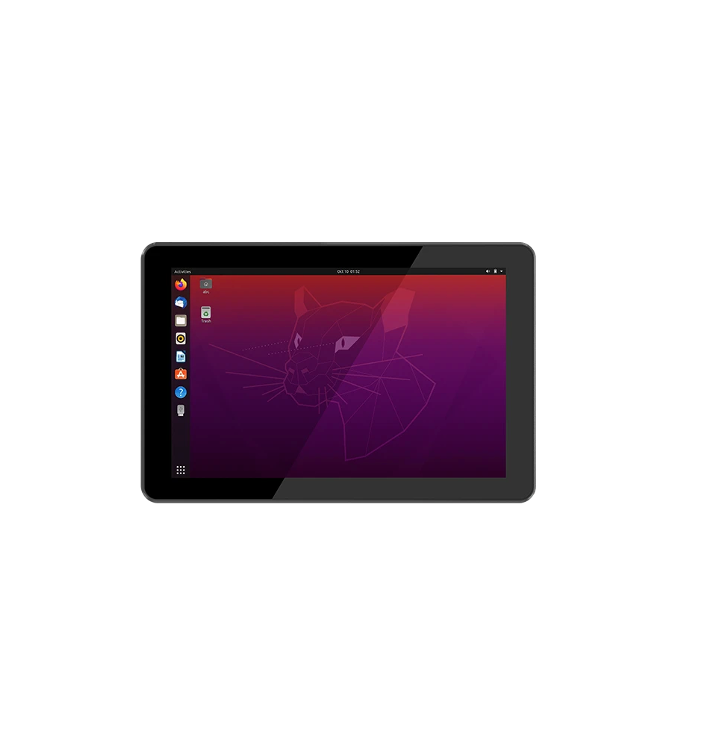
For modern automation projects, frontline engineers often deploy highly responsive 10.1-inch Industrial Panel PCs equipped with capacitive touchscreens. These advanced panels support multi-touch gestures, providing an incredibly intuitive user interface for operators while maintaining uncompromising industrial-grade durability with IP65-rated front bezels.
Box PCs are headless units, meaning they do not feature an integrated display. They are purposefully designed for embedded applications where physical space is at a premium. These compact, fanless systems are typically tucked away inside crowded control cabinets, mounted directly onto the chassis of automated guided vehicles, or bolted to the side of vibrating manufacturing machinery. They process critical data locally and transmit it to a centralized server or a separate, remote display unit.
For large-scale data acquisition, plant server rooms, or complex machine vision systems requiring multiple high-performance expansion cards, rackmount configurations are utilized. These robust systems conform to standard server rack dimensions. While they may utilize active cooling due to their immense processing power, they still feature industrial-grade motherboards, specialized dust filters, and vibration-resistant chassis designs with hold-down clamps for internal components.
Furthermore, the physical hardware represents only one half of the automation equation. The operating system dictates the software stability, network security, and integration capabilities of the device.
Over the past decade, Linux has become increasingly dominant in industrial automation and edge computing environments. Distributions like Ubuntu 22.04 Long Term Support are highly favored by software engineers for their exceptional systemic stability, incredibly low resource overhead, and robust security architecture. Because Linux is entirely open-source, developers possess complete control over the system architecture. They can strip away unnecessary background processes that could potentially interfere with real-time industrial tasks.
Utilizing open-source platforms also eliminates recurring commercial licensing fees, which significantly lowers deployment costs across a large facility. Modern hardware solutions, such as an Industrial Panel PC running Linux Ubuntu 22.04, are specifically optimized to provide seamless, out-of-the-box performance for developers tasked with building custom IoT gateways and proprietary dashboards.
While Linux offers superior flexibility for developers, Windows 10 or Windows 11 IoT Enterprise remains strictly necessary for specific use cases. If a manufacturing facility is already deeply locked into a legacy software ecosystem that requires a Windows environment, or if they rely on proprietary automation software that currently lacks Linux support, Windows IoT provides a highly stable, enterprise-grade alternative to the standard consumer Windows operating system.
In contrast to the perceived savings of buying cheap retail computers, transitioning to specialized industrial hardware is a highly profitable risk mitigation strategy. The financial justification for this investment lies firmly in long-term economic efficiency.
In the manufacturing sector, the cost of a single hour of unplanned downtime can easily exceed tens of thousands of dollars. Consumer-grade computers used in dusty, vibrating environments are highly prone to sudden motherboard failures, thermal throttling, and catastrophic data corruption. Industrial hardware is engineered specifically to prevent these exact failures, ensuring continuous operation. The prevention of just one major downtime event typically covers the premium cost of the hardware several times over.
While standard PCs boast a lower initial purchase price, their Total Cost of Ownership over a five-year period is significantly higher when deployed in a harsh manufacturing setting.
Cost Factor | Consumer PC over 5 Years | Industrial Hardware over 5 Years |
|---|---|---|
Initial Purchase | Lower upfront cost. | Higher initial investment. |
Replacement Cycle | Every 1 to 2 years due to environmental failure. | None. Designed for a 5 to 10 year lifespan. |
Maintenance & Repair | High. Requires frequent fan cleaning and drive replacement. | Minimal. Fanless architecture requires virtually zero maintenance. |
Downtime Costs | High risk of sudden production halts. | Extremely low risk of failure. |
Total Cost | Significantly Higher | Lower and Highly Predictable |
Selecting the appropriate hardware requires a systematic evaluation of both the physical environment where the device will live and the specific software workloads it must handle. Follow these engineering steps to ensure a perfect match.
Before reviewing processing specifications, carefully evaluate the physical installation site. If the device will be exposed to water spray or heavy particulate dust, an IP65-rated front panel is mandatory. If it will be installed in an unventilated outdoor kiosk, verify that the hardware's operating temperature range exceeds the expected environmental extremes of your region.
Over-specifying a processor wastes valuable budget, while under-specifying causes frustrating system lag. For basic data logging and simple interfaces, low-power processors are highly efficient and generate minimal heat. In contrast, complex supervisory systems and high-speed machine vision applications require multi-core processors capable of handling high-resolution camera feeds and complex real-time data visualization without stuttering.
For all-in-one panel solutions, the physical interface is critical. Resistive touch screens rely on physical pressure, making them highly reliable when operators must wear thick protective industrial gloves. Conversely, capacitive touch relies on the electrical properties of the human body. It supports multi-touch gestures and offers far better optical clarity. A 10.1-inch capacitive display strikes an excellent balance between readability and space conservation on a crowded machine panel.
Ensure the hardware seamlessly supports the physical infrastructure of your plant. Common mounting standards include VESA mounts for flexible swing arms, panel mounts for integrating the screen directly into heavy machinery console cutouts, and DIN-rail mounts for securely snapping headless units inside standardized electrical cabinets.
Ultimately, theoretical durability must translate into measurable operational stability on the floor. For operations managers and automation engineers, the true value of these computing platforms is demonstrated through their performance in highly demanding environments.
In modern manufacturing facilities, the interface screen serves as the critical bridge between human operators and automated machinery. Standard commercial monitors are highly susceptible to failure in these environments due to airborne particulates and continuous mechanical vibration. Instead, facilities deploy ruggedized panel solutions that combine the monitor and computing unit into a single, fully sealed enclosure. Implementing a ruggedized Industrial PC configured with a highly stable operating system ensures that critical control dashboards remain responsive day and night without software crashes.
Quality assurance has rapidly evolved from manual visual inspection to high-speed, automated optical inspection. Machine vision systems utilize high-resolution industrial cameras to scan products moving along a conveyor belt, searching for microscopic defects in mere milliseconds. This specific application requires immense computational power and specific connectivity protocols. Because these systems are often mounted directly onto the vibrating production line, fanless embedded units are typically utilized to avoid mechanical failure.
The food and beverage industry presents one of the most hostile environments imaginable for electronic equipment. Hardware deployed in meat processing plants or dairy facilities must feature specialized ingress protection. Engineers typically specify hardware with IP65, IP67, or IP69K ratings. Another critical design feature for this sector is a true-flat, bezel-free front panel. Traditional monitors feature a ridge where the screen meets the frame, which can accumulate water and organic matter, leading to bacterial growth. A seamless front panel completely eliminates this sanitary risk.
Warehouse operations require computing power that can physically move with the workforce. Forklifts are routinely equipped with vehicle-mounted computers to manage inventory routing and real-time logistics tracking. The primary challenge here is extreme mechanical shock. A forklift navigating uneven concrete subjects its mounted computer to severe physical stress. Hardware in this sector is rigorously tested against military standards for shock and vibration resistance. Additionally, ruggedized hardware utilizes internal optical bonding to prevent screen fogging when moving between cold storage and humid loading docks.
The operational lifespan of a ruggedized computing unit is significantly longer than that of a commercial-grade computer. While standard office computers are designed for a short lifecycle before component degradation occurs, industrial-grade hardware is engineered to last between 5 to 10 years in continuous operation. Manufacturers achieve this through strict component selection, utilizing industrial-grade capacitors and motherboards rated for extreme temperatures.
Yes, these systems operate on standard computing architectures and are fully capable of running standard operating systems and software applications. From a software perspective, they function exactly like a standard desktop PC or server. Facilities can run their existing automation software, resource planning systems, or proprietary machine control programs seamlessly without requiring specialized code translation.
A fanless design refers to a computer architecture that relies entirely on passive cooling methods rather than active mechanical fans to regulate internal temperatures. On a factory floor, ambient air is often filled with dust, metal shavings, or moisture. An active fan acts as a vacuum, pulling these contaminants directly onto sensitive electronic components, inevitably leading to short circuits. Fanless computers solve this by utilizing a thermodynamic design where the external aluminum chassis acts as a giant heatsink, keeping internal components completely sealed.
Programmable Logic Controllers and Industrial PCs are both foundational to factory automation, but they serve different primary functions. A Programmable Logic Controller is a specialized, hardware-based controller designed for real-time, highly deterministic control of machinery. It is incredibly reliable for micro-level machine control but lacks processing power for complex data analysis. An Industrial PC offers vastly superior computing power, large data storage capabilities, and advanced graphics processing for human-machine interfaces.
Many panel computers are designed with significant water resistance, but the exact level of protection is defined by their specific Ingress Protection rating. An IP65 rating means the front panel is completely dust-tight and protected against low-pressure water jets, making it ideal for environments that experience occasional splashing. IP69K is the highest level of protection, meaning the hardware can withstand continuous, high-pressure, and high-temperature chemical washdowns.
While both store data without moving parts, industrial Solid-State Drives are built with higher-grade NAND flash memory designed for extreme endurance and wide temperature variations. Consumer drives will rapidly degrade and lose data if subjected to the constant write-cycles of factory data logging or if operated in freezing or scorching temperatures. Industrial drives also feature power-loss protection circuits to prevent data corruption during sudden factory power outages.
Industrial panel PCs are designed with versatile mounting standards. The most common method for machinery integration is panel mounting, where a precise cutout is made in the machine's steel control cabinet. The PC is inserted from the front, and mounting clips are tightened from behind to create a watertight seal against the cabinet door. Alternatively, standard VESA mounting holes on the back allow the unit to be attached to swing arms or heavy-duty monitor stands directly on the factory floor.
Investing in true industrial hardware is the most effective way to secure plant floor reliability and eliminate sudden production stops. Stop losing money to fragile commercial computers. Explore high-performance, ruggedized computing solutions at Vincanwo Group to find the perfect hardware match for your automation workflows today.


