
Views: 0 Author: Site Editor Publish Time: 2026-02-06 Origin: Site


Public-facing digital terminals are everywhere, from self-service check-in counters to interactive wayfinding screens in hospitals and campuses. Behind many of these systems is a kiosk computer, a purpose-built computing platform designed to deliver a focused, secure, and continuously available user experience. For organizations deploying kiosks at scale, understanding what a kiosk computer really is—and why it differs from ordinary PCs or tablets—directly affects reliability, security, and long-term operating cost. As a long-term supplier of industrial computers and network broadcast systems, Vincanwo Group designs and manufactures kiosk computers specifically for these demanding environments, helping customers build stable and manageable deployments rather than fragile one-off setups.
A kiosk computer is a dedicated computer system—often integrated with a touchscreen—that runs a limited set of applications for a single, clearly defined task in a public or semi-public environment.
When people hear the term “kiosk,” they usually picture a touchscreen terminal where users can place orders, check in for appointments, browse information, or view digital content. At its core, a kiosk computer enables exactly that: it provides the computing power behind an interactive kiosk, allowing users to complete a task without staff assistance. Unlike consumer devices, it is designed for continuous operation, minimal user control, and predictable behavior, even when used by thousands of different people.
Calling it a kiosk “computer” rather than a kiosk “screen” is important. A kiosk computer includes a full operating system, application environment, network connectivity, and support for peripherals such as printers, scanners, cameras, card readers, and payment devices. This computing layer is what allows kiosks to integrate with backend systems, pull updated content, log usage data, and maintain consistent performance. Vincanwo Group focuses on this computing foundation, producing industrial-grade hardware that can be adapted to different kiosk enclosures and deployment scenarios.
A kiosk computer is defined less by its appearance and more by the role it plays. In real-world deployments, it typically serves one of several core functions, each with distinct technical requirements.
Self-service is one of the most common applications. Kiosk computers power ordering systems in restaurants, ticketing machines in transport hubs, patient check-in terminals in clinics, and self-registration stations in corporate lobbies. In these scenarios, the computer must handle touch input accurately, communicate securely with backend systems, and recover gracefully from network interruptions. Reliability matters because downtime immediately translates into lost revenue or frustrated users.
In museums, universities, hospitals, and large commercial complexes, kiosk computers are used to provide maps, directories, schedules, and educational content. These kiosks may not process payments, but they often need to run multimedia applications, respond quickly to user input, and update content centrally. A kiosk computer designed for this role must balance performance with long-term stability, especially when devices are spread across multiple buildings or sites.
Many modern kiosks blend digital signage with interactivity. A screen may loop scheduled promotional content most of the time, then switch instantly to an interactive mode when a user touches the display. This dual role requires a computer that can handle content scheduling, remote updates, and touch-driven applications without conflicts. Vincanwo Group’s network broadcast and kiosk computer solutions are designed for exactly this scenario, where centralized content delivery and local interaction must work together seamlessly.
One of the defining characteristics of a kiosk computer is not what it can do, but what it prevents users from doing.
Kiosk mode refers to a configuration in which the operating system restricts user access to a single application or a limited set of approved applications. Users cannot exit to the desktop, change system settings, install software, or browse unauthorized websites. This can be implemented at the operating system level and reinforced with additional software controls. The result is a predictable user experience that behaves the same way every time.
In public environments, unrestricted computers quickly become problematic. Users may intentionally or accidentally change settings, access inappropriate content, or interrupt critical processes. A locked-down kiosk computer prevents these issues by isolating the user from the underlying system. This protects not only the device itself but also the organization’s network, data, and brand reputation. Vincanwo Group designs kiosk computers with this controlled usage model in mind, ensuring that hardware and system configuration support long-term stability.
Basic kiosk mode works well for small deployments, but larger networks often require more advanced management. When dozens or hundreds of kiosks are deployed across multiple locations, administrators need centralized control over updates, configurations, logs, and system health. This is where a kiosk computer integrated with remote management and network broadcast capabilities becomes essential. Vincanwo Group’s solutions address this operational reality by treating the kiosk not as a standalone device but as part of a managed system.
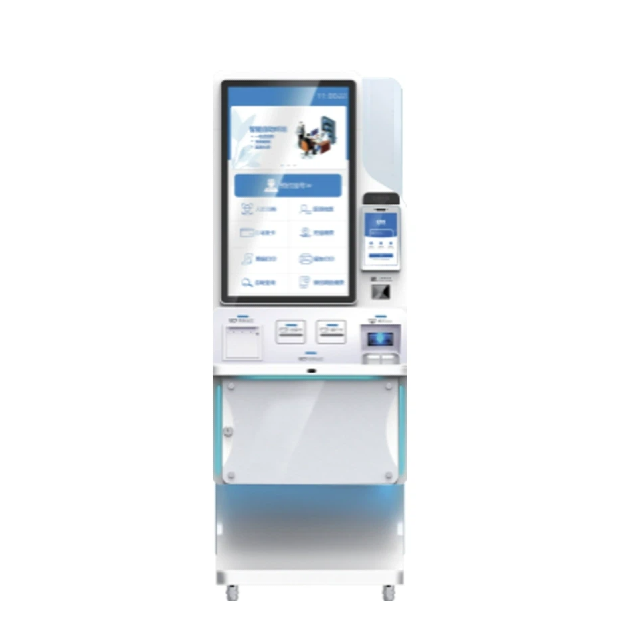
A successful kiosk deployment depends on how well its components work together. A kiosk computer system typically consists of three tightly connected layers.
The hardware layer includes the industrial PC or embedded computer, the touchscreen, the enclosure, and all physical interfaces. Kiosk computers must support multiple input and output options, from USB and serial ports to Ethernet and wireless connectivity. They also need to be mechanically robust, capable of operating for long periods, and compatible with different mounting methods. Vincanwo Group manufactures industrial computers specifically for such environments, ensuring durability and flexibility across use cases.
On top of the hardware sits the software layer. This includes the operating system, kiosk application, browser lockdown tools, and device management software. The goal is to deliver a smooth user interface while keeping the system locked down and easy to maintain. Software stability is just as important as hardware reliability, because crashes or freezes directly impact user trust and operational efficiency.
The final layer is connectivity. Many kiosk deployments rely on centralized servers to manage content, configurations, and updates. In this model, a network broadcast server acts as the management hub, while individual kiosk computers function as controlled endpoints. Vincanwo Group’s network broadcast and kiosk computer solutions are designed to work together, enabling centralized content delivery and consistent configuration across all terminals.
Despite careful planning, kiosk deployments can fail if common risk factors are ignored. Understanding these failure points helps organizations design more resilient systems.
Kiosks are often installed in environments that are not climate-controlled. Heat buildup, dust, and poor ventilation can shorten component lifespan or cause unexpected shutdowns. Choosing between fan-cooled and fanless designs, and ensuring proper enclosure ventilation, is critical. Industrial-grade kiosk computers from Vincanwo Group are engineered to handle these conditions more effectively than consumer hardware.
Network reliability is another frequent issue. If a kiosk computer depends entirely on a single network connection, any outage can render it unusable. Well-designed systems include redundancy, offline behavior, or cached content so that the kiosk remains functional even during temporary disruptions. This is especially important for information kiosks and digital signage.
Every kiosk requires maintenance, whether it involves software updates, system reboots, or hardware replacement. Without remote management, these tasks become labor-intensive and expensive. By designing kiosk computers that integrate with centralized management platforms, Vincanwo Group helps customers reduce maintenance effort and improve uptime across large deployments.
The differences between device types are not always obvious at first glance. The table below highlights how kiosk computers compare to common alternatives.
Device type | Best for | Lockdown options | Peripheral support | Remote management fit | Typical deployment risk |
Kiosk computer | Public, long-term deployments | Strong, system-level | Extensive | High | Low when properly configured |
Regular PC | Office or supervised use | Limited | Moderate | Moderate | High misuse risk |
Tablet kiosk | Lightweight or temporary use | App-level | Limited | Low to moderate | Durability and control issues |
This comparison helps decision-makers quickly identify which platform aligns with their operational needs.
A kiosk computer is the right choice when an organization needs a focused task interface, a controlled user environment, and the ability to manage devices at scale. Unlike general-purpose PCs or consumer tablets, kiosk computers are designed for predictability, security, and longevity. Vincanwo Group’s Network Broadcast and Kiosk Computers are built with these priorities in mind, combining industrial hardware with centralized content delivery and remote management. For public spaces, educational institutions, and corporate environments, this approach reduces risk while improving user experience.
If you are planning a kiosk deployment or upgrading an existing system, Vincanwo Group can support you with purpose-built solutions that align with real operational requirements. Our team supplies and manufactures industrial computers and network broadcast systems that form the backbone of a reliable interactive kiosk system.
What makes a kiosk computer different from a normal PC?
A kiosk computer is designed to run a limited set of applications in a locked-down environment, making it more secure and predictable for public use than a normal PC.
Can kiosk computers be managed remotely?
Yes. Many kiosk computers, including those from Vincanwo Group, support centralized management for updates, monitoring, and content delivery.
Are kiosk computers suitable for 24/7 operation?
Industrial-grade kiosk computers are designed for continuous operation and are more reliable in long-running deployments than consumer hardware.
Do kiosk computers support external devices like printers and scanners?
Most kiosk computers provide extensive I/O options, allowing integration with printers, scanners, payment terminals, and other peripherals.


