
Views: 0 Author: Site Editor Publish Time: 2026-02-11 Origin: Site


Public-facing digital systems are no longer experimental tools; they have become core infrastructure in retail, education, transportation, healthcare, and corporate environments. When organizations plan deployments for the coming years, selecting the right kiosk computer is no longer just a hardware decision. It is a long-term operational choice that affects security, scalability, maintenance cost, and user trust. As a high-tech manufacturer of industrial computers and network broadcast systems, Vincanwo Group designs kiosk computers with future-ready deployments in mind, helping customers move beyond short-term fixes toward sustainable systems that remain stable through 2026 and beyond.
One of the most common mistakes in kiosk planning is beginning with display size or appearance. While aesthetics matter, the intended use case defines nearly every technical requirement that follows.
A self-service transaction kiosk must handle secure inputs, payments, backend communication, and error recovery. An information kiosk focuses more on content clarity, navigation speed, and uptime. Digital signage kiosks with touch interaction must balance scheduled playback with instant responsiveness. Each scenario places different demands on processing power, storage, operating system configuration, and peripheral support. Vincanwo Group’s kiosk computers are designed to adapt to these varying roles rather than forcing one configuration into every scenario.
Beyond function, expected usage volume matters. A kiosk handling hundreds of sessions per day faces different stresses than one used occasionally. Peak-hour congestion, continuous operation, and installation environment all influence hardware specifications. Considering daily load early helps prevent underpowered systems that struggle long before their expected service life ends.
Kiosk success depends on consistency. Users expect a predictable experience that does not expose system complexity.
Single-application kiosks are easier to secure and maintain. When the system launches directly into one task, there are fewer paths for user error or misuse. This approach minimizes crashes and simplifies updates, which is especially valuable in high-traffic environments.
Some deployments require multiple applications, such as browsing information and completing transactions. These setups demand stricter policies, carefully designed user flows, and stronger system controls. A kiosk computer that supports robust lockdown at the operating system level provides the flexibility needed without sacrificing stability.
Downtime is costly, whether measured in lost revenue, frustrated users, or staff intervention. Remote management transforms kiosk operations from reactive to proactive.
A modern kiosk deployment should allow administrators to update software, reboot systems, monitor device health, and push content without visiting each site. These capabilities reduce response time and keep kiosks operational even when issues arise. Vincanwo Group’s network broadcast and kiosk computer solutions are built to support centralized management at scale.
Managing one kiosk is simple. Managing dozens across multiple locations is not. Fleet thinking means designing systems that remain manageable as deployments grow. Choosing a kiosk computer that integrates smoothly with centralized management platforms ensures that scaling up does not multiply operational complexity.
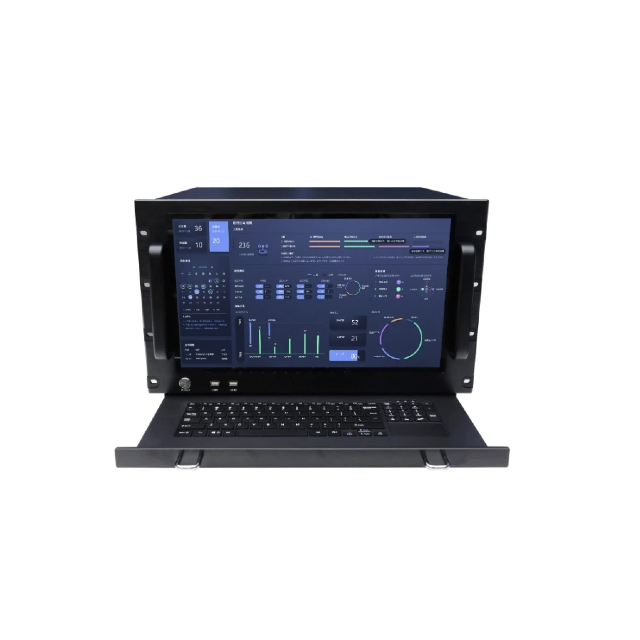
Security does not stop at the touchscreen. Public kiosks are exposed endpoints that must be protected at multiple levels.
Physical and system-level controls are essential. Restricting ports, managing user privileges, and controlling removable media access help prevent unauthorized use. Industrial kiosk computers are designed with these protections in mind, reducing vulnerabilities that consumer devices often overlook.
Users expect that their interactions will not persist after they walk away. Clearing sessions automatically and preventing access to previous data is critical for trust, especially in healthcare and financial contexts. A well-configured kiosk computer supports these privacy requirements without complicating the user experience.
Kiosks often operate at the edge of corporate networks. Treating them as exposed endpoints encourages safer architecture, including segmentation and controlled communication paths. Vincanwo Group’s systems are designed to integrate into such secure network environments.
Deployment scenario | Lockdown type | Cooling preference | Recommended connectivity | Peripheral priorities | Remote management needs |
Retail self-checkout | Single or guided multi-app | Fanless or filtered fan | Ethernet + backup wireless | Scanner, printer, payment | Central updates and monitoring |
Digital signage with touch | Single app with scheduler | Fanless | Ethernet | Touch display, media I/O | Content broadcasting |
Education or campus info | Multi-app | Fanless | Ethernet + Wi-Fi | Touch, optional camera | Usage analytics |
Factory-floor terminal | Single app | Fanless industrial | Wired Ethernet | Barcode, rugged I/O | Health monitoring |
Corporate lobby check-in | Single or dual app | Fanless | Ethernet | Camera, printer | User session control |
This comparison helps decision-makers align requirements with realistic configurations rather than assumptions.
Kiosks operate in environments that vary widely, and thermal design determines long-term reliability.
Dust, grease, vibration, and temperature fluctuations are common in industrial environments but rare in clean lobbies. Selecting a kiosk computer designed for the actual environment prevents premature failure and unplanned maintenance.
Neither cooling approach is universally superior. Fanless designs reduce maintenance and perform well in dusty settings, while fanned systems support higher performance in controlled environments. Vincanwo Group offers configurations suited to both, allowing deployments to match environmental realities rather than compromise.
Many kiosks start simple and grow more complex over time. Planning for expansion avoids costly redesigns.
Barcode scanners, printers, cameras, NFC readers, and payment terminals are often added after initial deployment. A kiosk computer with flexible I/O support ensures these additions integrate smoothly rather than requiring replacement hardware.
Ethernet remains the standard for stability, but wireless and cellular backups add resilience. Considering connectivity options early helps kiosks remain operational even during network disruptions.
A kiosk deployment should remain viable for years, not months.
Operating systems evolve, and kiosk mode policies change. Selecting a kiosk computer that supports long-term OS compatibility and testing ensures smooth transitions rather than forced replacements.
Components wear over time. Storage devices, connectors, and power supplies should be replaceable without discarding the entire system. Industrial kiosk computers from Vincanwo Group are designed with serviceability in mind, extending operational life and reducing total cost.
By 2026, kiosk deployments will demand more than basic functionality. Decision-makers should review these seven factors as a checklist: use case alignment, lockdown strategy, remote management, layered security, environmental tolerance, expansion readiness, and lifecycle planning. Vincanwo Group’s Network Broadcast and Kiosk Computers combine these considerations into integrated solutions that support secure, locked-down user experiences and centralized management across public spaces, educational institutions, and corporate environments.
For organizations planning future deployments, working with a supplier that understands both industrial hardware and system-level management can make the difference between a scalable solution and a fragile setup. If you are evaluating options for your next deployment, our team is ready to assist with configuration guidance and technical insight for your kiosk computing platform.
What should I prioritize first when selecting a kiosk computer for future deployments?
Start with the use case and operating environment, then evaluate security, management, and lifecycle requirements before focusing on appearance.
Is remote management really necessary for small kiosk deployments?
Even small deployments benefit from remote management by reducing maintenance effort and minimizing downtime.
How important is operating system compatibility for kiosks planned for 2026?
OS compatibility is critical, as unsupported systems can create security risks and limit future updates.
Can one kiosk computer configuration suit multiple environments?
While flexible platforms exist, aligning configurations with specific environments delivers better reliability and lower long-term costs.


