
Views: 0 Author: Site Editor Publish Time: 2026-09-10 Origin: Site


The rapid expansion of Industry 4.0 and the Internet of Things is fundamentally transforming how modern facilities operate. As automated systems grow more complex, the underlying hardware must be robust enough to keep production lines running without interruption. Recent market analyses reveal a definitive shift in industrial computing. Manufacturers are aggressively pushing AI-driven automation directly to the factory floor. The reliance on localized data processing is surging. Enterprises are actively moving away from centralized cloud architectures to bypass latency bottlenecks. This makes ruggedized edge hardware an indispensable asset for real-time decision-making.
I have seen countless commercial desktops die on the factory floor within weeks. Deploying standard consumer-grade computers in these harsh environments is a recipe for disaster. Airborne contaminants, extreme temperature fluctuations, and relentless machinery vibrations quickly destroy commercial electronics. The result is catastrophic downtime, massive data loss, and potential safety hazards. This guide will walk you through the critical factors required to evaluate, compare, and confidently procure the right edge computing hardware for your specific operational needs.
Purpose-built computing systems utilize rugged enclosures, extended component lifecycles, and fanless cooling architectures to survive where commercial electronics fail.
Selecting the optimal form factor depends entirely on your spatial constraints and human-machine interface requirements.
Environmental certifications like IP65 ratings and wide-temperature tolerances are equally as critical as processing power when deploying hardware outside of climate-controlled server rooms.
Comprehensive input/output connectivity ensures seamless integration between modern edge analytics and existing legacy machinery.
An industrial computer is a specialized computing system engineered from the component level up to operate flawlessly in extreme environments. Standard commercial hardware is built for pristine offices. These robust machines are designed to resist heavy kinetic shock, electromagnetic interference, and moisture ingress.
Historically, manufacturing data was transmitted to centralized cloud servers for processing. Modern automated systems generate terabytes of data every single day. Relying exclusively on the cloud introduces unacceptable latency, consumes massive bandwidth, and creates potential security vulnerabilities during transmission. This is exactly where localized processing becomes essential.
By deploying purpose-built computing systems directly at the source of data generation, data is analyzed in real-time. Think of an autonomous warehouse vehicle or a remote outdoor sensor station. Rugged edge devices process complex algorithms locally. They trigger immediate mechanical responses, reduce network delays to mere milliseconds, and keep sensitive operational data securely on-site.
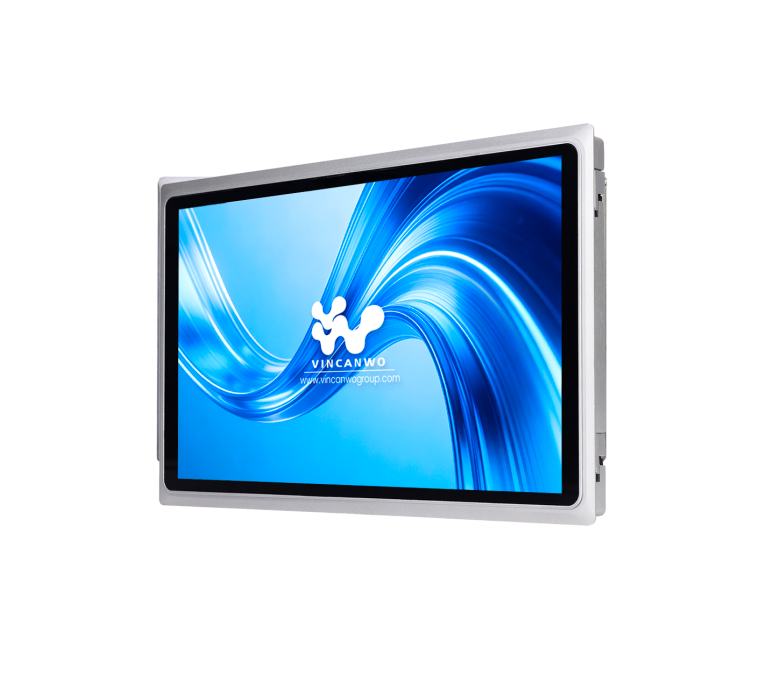
Understanding the structural and operational disparities between consumer systems and industrial computing solutions is vital for accurate hardware procurement. Purchasing based solely on CPU speed often leads to rapid equipment failure.
Feature | Commercial PC | Industrial PC |
|---|---|---|
Enclosure Material | Lightweight plastic or thin sheet metal | Heavy-duty extruded aluminum alloy |
Cooling Method | Active cooling via internal fans | Fanless passive cooling heat sink |
Operating Temperature | 10°C to 35°C | -20°C to 60°C or wider |
Product Lifecycle | 1 to 2 years | 5 to 10 years guaranteed |
Shock & Vibration | Minimal resistance | MIL-STD-810G certified testing |
Standard desktops utilize lightweight plastics offering minimal protection against physical impact or the electromagnetic interference generated by high-voltage factory equipment. Industrial computers are constructed using heavy-duty extruded aluminum. This ruggedized exoskeleton protects internal circuitry from mechanical shock while acting as a Faraday cage against electromagnetic interference. Internally, the architecture frequently features a cable-less design. Components are soldered directly to the motherboard to prevent disconnections caused by continuous vibration.
Cooling mechanisms represent one of the most prominent failure points in standard electronics. Commercial PCs rely on internal fans to circulate air over the processor. On a CNC machining floor, these fans act like vacuums. They inhale metallic dust, chemical vapors, and moisture directly onto the motherboard, inevitably causing rapid short circuits.
To combat this fatal flaw, industrial hardware utilizes passive cooling. The heavy extruded aluminum chassis functions as a massive heat sink. Internal heat-generating components are connected to the chassis via thermal pads, allowing heat to dissipate outward through external fins. This thermodynamic design enables the computer to remain completely sealed against environmental contaminants.
Consumer PCs operate on a volatile product lifecycle with models changing every few months. This rapid turnover creates massive integration headaches for enterprise buyers who require standardized hardware across long-term deployments. Industrial computer manufacturers utilize embedded component roadmaps guaranteeing a strict product lifecycle of 5 to 10 years. Facilities can confidently certify a specific hardware configuration, knowing they can source the exact same machine a decade later without rewriting custom software or altering machine enclosures.
Industrial computing hardware is categorized by its physical form factor. This dictates how and where the device can be mounted within a facility.
These compact units lack a built-in monitor and are designed for pure data processing. Their minimal footprint allows them to be tucked away inside tight control cabinets or mounted on DIN rails alongside programmable logic controllers. They serve primarily as IoT gateways or data aggregation nodes where direct human interaction is unnecessary.
When operators require a graphical interface to monitor automated processes or input commands, a Panel PC is the standard solution. This form factor seamlessly combines the computing power of an embedded PC with a ruggedized touchscreen monitor. For operators needing a reliable interface on the factory floor, deploying a 15.6-inch industrial panel PC provides an optimal balance. These units often feature a 10-point capacitive touchscreen, a true-flat IP65 front bezel, and a robust aluminum alloy enclosure. This specific configuration ensures responsive human-machine interaction even when operators are wearing light gloves or dealing with coolant spray.
Rackmount systems are highly scalable computers designed to fit into standard 19-inch IT racks. They feature industrial-grade motherboards and redundant power supplies. These units are typically deployed in factory control rooms for high-performance tasks such as complex multi-camera machine vision processing or factory-level server hosting.
Selecting the correct internal specifications ensures the computer can handle its required workload without overspending on unnecessary computing power or generating excess heat.
Do not over-spec your processor just because it looks good on paper. Match the central processing unit to the edge application. Low-power processors like the Intel Celeron J6412 are highly efficient and generate minimal heat. They are perfect for basic data logging and lightweight HMI tasks in highly compact enclosures. High-performance processors like Intel Core i5 or i7 are mandatory for real-time machine vision, deep learning, and AI inferencing at the edge.
System memory dictates how much data can be processed simultaneously. A baseline of 4GB to 8GB is generally sufficient for simple PLC logic and standard data forwarding. Running high-resolution visual inspection algorithms or multiple virtual machines at the edge will require 16GB to 32GB of wide-temperature RAM. For critical infrastructure, Error-Correcting Code RAM is highly recommended to prevent data corruption.
Traditional spinning hard drives contain moving read and write heads that easily crash when exposed to kinetic stress. Industrial computers exclusively utilize Solid State Drives. For maximum reliability, industrial-grade SSDs are preferred over consumer drives due to their higher write-endurance. NVMe M.2 SSDs are now the standard for applications requiring rapid data transfer.
Hardware specifications mean nothing if the computer cannot survive its physical deployment zone. Validating environmental ratings is a critical step in the procurement process.
Standard PCs are rated for mild office climates. True industrial edge computers are engineered with wide-temperature components. Through the use of specialized motherboards and high-tolerance capacitors, these systems operate reliably in extreme environments ranging from -20°C to 60°C or even wider. This makes them suitable for both cold storage warehouses and remote desert oil rigs.
Heavy stamping presses and in-vehicle deployments subject hardware to continuous mechanical stress. Industrial PCs undergo rigorous military standard testing for shock and vibration. The internal architecture ensures that RAM modules, storage drives, and expansion cards do not vibrate loose over years of operation.
The IP rating system defines a device's ability to repel solids and liquids. An IP65 rating offers complete dust protection and resistance to low-pressure water jets. This is often found on the front bezel of Panel PCs to allow for routine wipe-downs. An IP67 rating means the system is fully waterproof and capable of temporary submersion. For hygienic environments like meat processing plants, an IP69K rating is required to withstand high-pressure, high-temperature chemical washdowns.
An edge computer is only effective if it can successfully communicate with the surrounding industrial ecosystem. Rich input and output connectivity bridges the gap between legacy machinery and modern IT networks.
Commercial computers have abandoned older interfaces. Manufacturing environments still rely heavily on them. Serial ports like RS-232 and RS-485 are mandatory for connecting to legacy PLCs, barcode scanners, and older sensors. Digital input/output ports are also critical for sending direct electrical signals to trigger alarms or control relays without relying on a network protocol.
For modern data transmission, standardizing on fanless industrial computers that offer multiple Gigabit LAN ports is essential. Dual LAN allows administrators to physically separate internal machine networks from external corporate networks. Power over Ethernet ports are highly valuable in visual inspection setups, enabling the PC to send data and power to industrial IP cameras through a single cable.
Edge computers are frequently deployed in remote locations where running physical ethernet cables is impossible. Internal expansion slots allow for the seamless integration of Wi-Fi, Bluetooth, and 4G/5G cellular modules to maintain continuous cloud connectivity.
Software stability and hardware-level security are paramount when deploying computers outside of a secure server room.
Consumer operating systems force automatic updates. This can unexpectedly reboot a machine and cause catastrophic downtime on an active assembly line. Industrial systems typically utilize Windows 10 IoT Enterprise. This specialized version strips away consumer bloatware and disables forced feature updates, ensuring the system remains stable for its operational lifespan.
Edge computers are often physically accessible to unauthorized personnel. Hardware-based security is an absolute necessity. The inclusion of a TPM 2.0 chip provides hardware-level encryption, secure boot processes, and cryptographic key storage. Even if the physical storage drive is stolen from the factory floor, the data remains encrypted and unreadable.
Procuring hardware for edge computing requires a systematic approach. Follow this evaluation checklist to ensure you make a data-driven decision that aligns with your operational requirements.
Step 1: Define the Core Application and Workload
Before reviewing technical specifications, define exactly what the system will do. If the goal is to aggregate sensor data, a low-power embedded box PC is sufficient. Applications requiring real-time defect detection need high-performance CPUs. If operators must interact directly with machinery, investing in purpose-built touch displays ensures reliable operation.
Step 2: Measure Physical Space and Mounting Requirements
Industrial environments rarely offer standard desk space. Assess your deployment area to narrow down hardware choices. Control cabinets typically require compact DIN-rail mounting. HMI applications often demand VESA mounts on articulating arms or panel mounts integrated directly into a machine enclosure door.
Step 3: Identify Environmental Hazards
Audit the deployment location for potential hazards. Airborne particulates require fanless designs. Moisture and liquid exposure dictate the necessity of IP65 ratings. Extreme temperatures demand specialized wide-temperature internal components.
Step 4: Audit Required I/O Connections
Take an inventory of all existing machinery, sensors, and cameras the PC must connect to. Ensure the chosen hardware natively supports necessary legacy serial protocols without requiring unreliable USB adapters. Verify the presence of adequate LAN and high-speed USB ports.
Step 5: Verify Manufacturer Warranty and Lifecycle Support
Confirm that the hardware vendor offers a strict revision control policy and guarantees component availability for at least 5 to 10 years. This long-term lifecycle support ensures that your enterprise can standardize on a single hardware configuration, drastically simplifying future maintenance.
Choosing the right hardware guarantees daily operational efficiency. It safeguards your facility against unexpected downtime. Proper edge computing devices are a foundational investment that scales seamlessly with your Industry 4.0 initiatives. Always balance your current processing needs with future expansion capabilities, ensuring you have the necessary performance headroom for tomorrow's automation tasks. When you are ready to upgrade your factory floor, explore specialized product lines like the Vincanwo 15.6" Fanless All-in-One PC TPRO-156 to elevate your localized data processing. Assess your specific requirements today and standardize on hardware built to last.
The operational lifespan of industrial computing hardware significantly exceeds that of standard commercial desktops. A typical office PC may begin to experience component degradation within 3 years. Purpose-built industrial computers routinely deliver reliable performance for 7 to 10 years. This extended longevity is primarily due to the stringent selection of industrial-grade internal components and the elimination of moving parts.
Technically, a standard commercial PC can process data at the edge if deployed in a perfectly clean, climate-controlled, and vibration-free environment. However, deploying a regular PC directly onto a factory floor, inside a heavy machine, or in an outdoor enclosure will inevitably lead to rapid and catastrophic failure due to dust ingestion, thermal throttling, and kinetic shock.
A fanless computer utilizes passive cooling technology rather than relying on mechanical fans to regulate internal temperatures. The external heavy-duty metal chassis acts as a massive heat sink. The internal heat-generating components are thermally coupled directly to this casing, which efficiently dissipates the heat into the surrounding air. This allows the computer enclosure to be completely sealed against airborne contaminants.
The initial capital expenditure for industrial hardware is higher, but procurement decisions must be based on Total Cost of Ownership. The higher upfront cost covers specialized engineering, wide-temperature components, heavy-duty metal enclosures, and extensive testing. More importantly, it includes long-term lifecycle support. When a consumer PC fails on an assembly line, the cost of unexpected factory downtime far exceeds the initial price difference of the hardware.
A Programmable Logic Controller is designed specifically for real-time, deterministic control of machinery and relays using simple logic programming. An Industrial PC is a full-fledged computer capable of running complex operating systems, handling massive data aggregation, machine vision processing, and advanced human-machine interface tasks. Modern automation often uses both working in tandem.
For basic data logging and HMI tasks, 4GB to 8GB of RAM is sufficient. However, if you are running edge AI applications such as real-time visual defect detection or deep learning inferencing, you will need a minimum of 16GB of RAM. For complex, multi-camera setups, 32GB of high-speed, wide-temperature RAM is highly recommended to prevent bottlenecks.


